


Professional Learning Plan (PLP)
Turning reflection into meaningful practice improvement.
We recognize that practice is not just clinical – it reflects the full scope of a physician’s professional work. This includes, but is not limited to:




We encourage all practising family physicians to start a PLP.
Why? Because there’s always room for improvement, even in our professional practice.

Physicians use the PLP to:
-
Reflect on their current practice and identify meaningful areas for improvement
-
Meet continuing professional development (CPD) or regulatory expectations
-
Respond to feedback, data, or evolving practice demands
-
Translate learning needs into clear, actionable goals
When you’ve completed your PLP, you should be able to:
-
Identify a focused area of improvement in your practice
-
Develop a clear, outcome-based goal
-
Build and implement a practical action plan
-
Evaluate the impact of your changes using reflection and feedback
-
Earn Mainpro+ certified assessment credits (12 self-guided or 20 peer-supported)

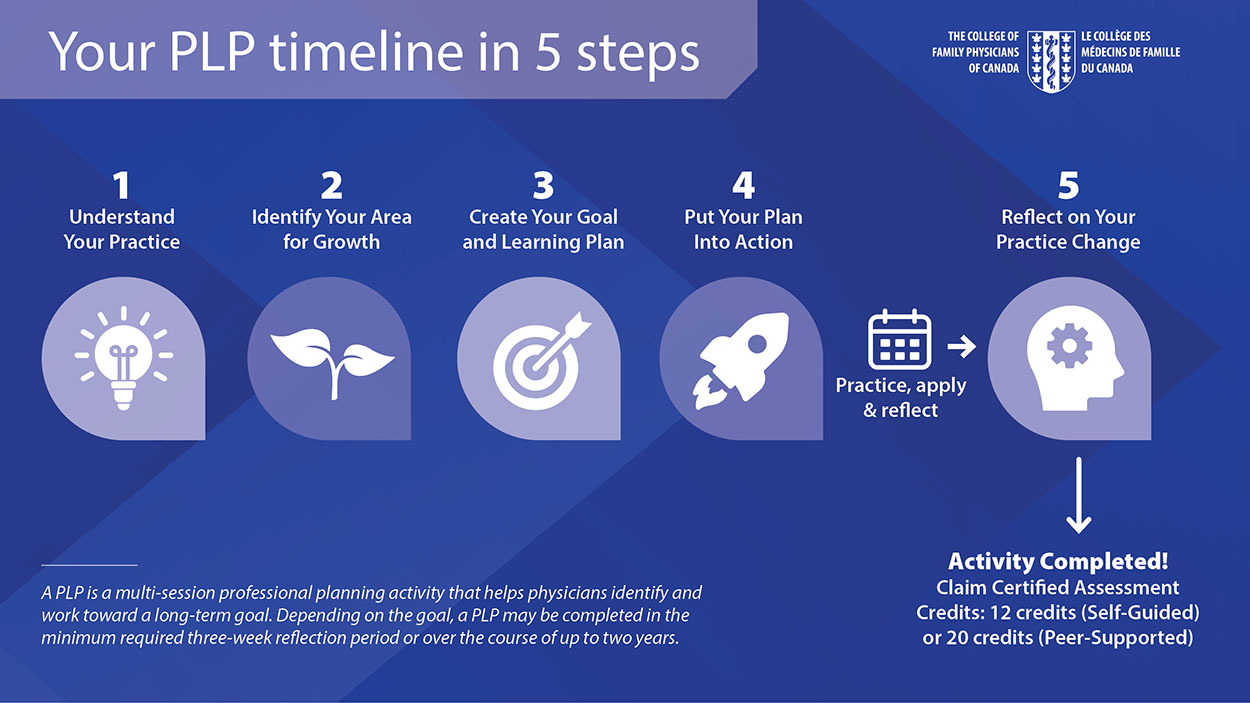
Watch this quick video to see how it works in just 5 steps.
Choose Your Pathway
-
Complete the PLP independently
-
Twelve Mainpro+ certified assessment credits
-
Ideal if you prefer to work through the activity on your own
- Discuss your plan with a peer
- Receive feedback and perspective
- Twenty Mainpro+ certified assessment credits
Features that set you up for success!
- AI-supported reflection and tools
- Complete at your own pace within the allotted two-year timeline
- Save your progress and return anytime
- Earn 12 or 20 Mainpro+ certified assessment credits (depending on your pathway)
- A free CFPC program
Getting Started
-
Can I access a PLP I started before the Fall 2026 refresh?
Yes. PLPs with content completed through Step 3 or beyond are available as PDFs under My Account > Documents. Completed PLPs are also available there for your records.
-
Who can use the PLP?
The PLP is available to CFPC members, including practising family physicians and family medicine residents.
-
I’m a family medicine resident. How do I get started?
Resident members can access the PLP through their Mainpro+ dashboard. Simply log in to your Mainpro+ account and access the PLP from your dashboard.
When you enter your first active five-year Mainpro+ cycle, you may carry over up to 40 Mainpro+ certified credits earned during residency. PLPs that are not completed during your residency cycle cannot be carried forward and will not be available once you transition to your first active five-year cycle. -
Can the PLP be used in a team or group practice setting?
While the PLP is completed by an individual member, it can be a valuable resource for team or group practice discussions. Each physician must complete their own PLP to receive credits.
Pathways and Peer Support
-
Do I need a peer to complete the PLP?
No. You can choose between a self-guided pathway or a peer-supported pathway.
A peer can be an educator, a team member, supervisor, mentor, colleague, or another physician. The CFPC does not provide peer matching. -
I've been asked to review a colleague’s PLP. What do I need to do?
As a peer reviewer, your role is to provide feedback, perspective, and support as your colleague develops and implements their learning plan. You do not need to evaluate performance or approve the PLP.
Need help getting started? See the Peer Support Resource Guide.
Credits and Completion
-
How many credits can I earn?
You can earn:-
Twelve Mainpro+ certified assessment credits through the self-guided pathway
-
Twenty Mainpro+ certified assessment credits through the peer-supported pathway
Credits are automatically recorded in your Mainpro+ account once the PLP is completed.
For residents, please refer back to Q2: I’m a family medicine resident. How do I get started?
-
-
What if I don’t achieve my PLP goal?
You will still receive credit if you complete all components of the PLP. Understanding what worked, what didn't, and what you learned is an important part of the process.
-
Can I work on more than one PLP at a time?
Yes. You can work on up to three PLPs simultaneously.
-
How long do I have to complete the PLP?
You have up to two years to complete your PLP and can work at your own pace throughout that period.
Let’s get started!
Create a focused goal, put your learning into action, and earn Mainpro+ certified assessment credits.
Still have questions? Contact [email protected].